
Also known as Continuous Focus, AF Servo is maintained by partially pressing the camera’s shutter release button, which enables you to maintain focus continuously on a moving subject as the subject moves within the frame. Shutter-response times are usually faster in AF Servo, since the subject is already in focus. For more on this subject, see the explora article, “Choosing Autofocus Modes.”
A
Aperture
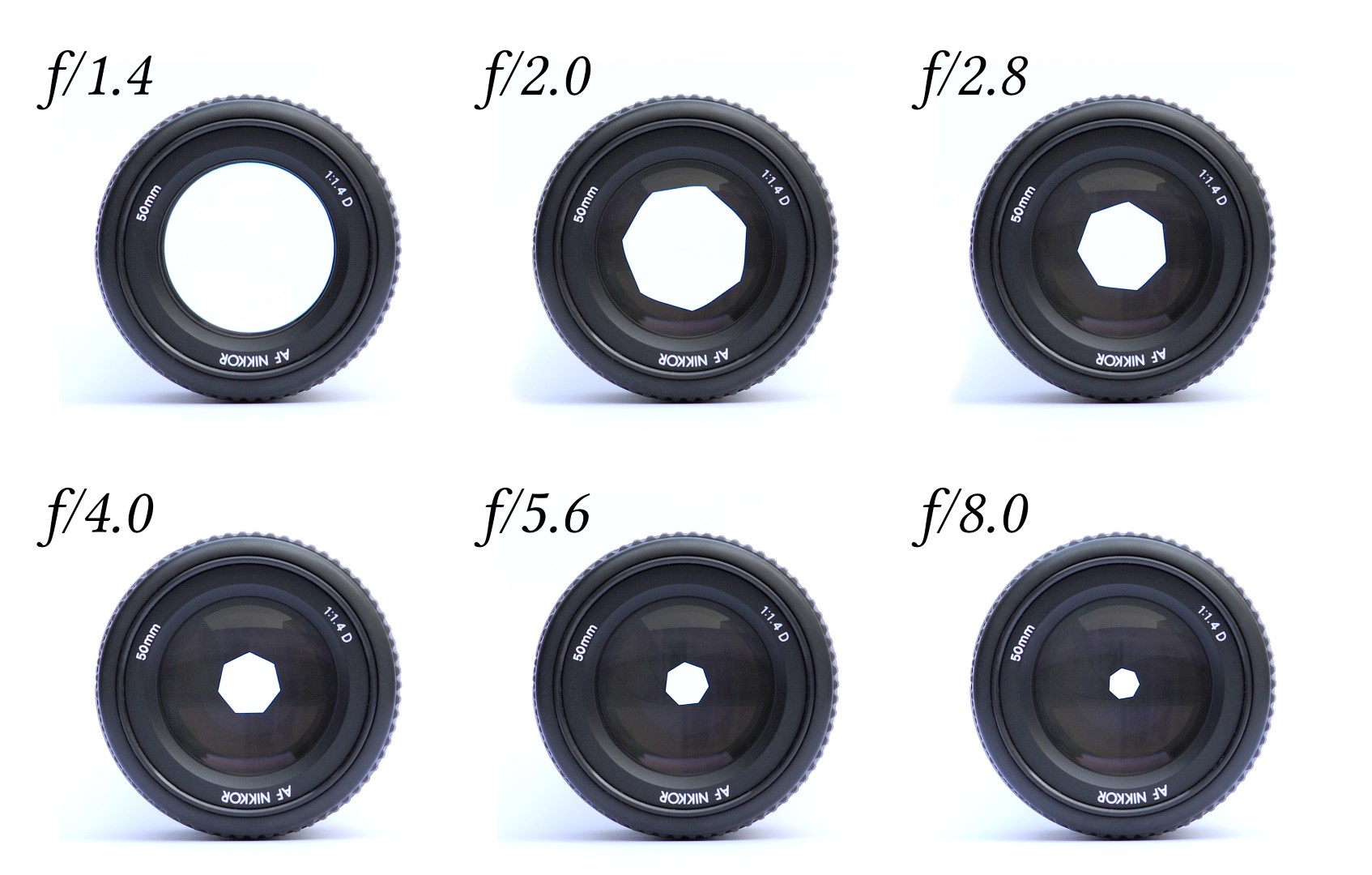
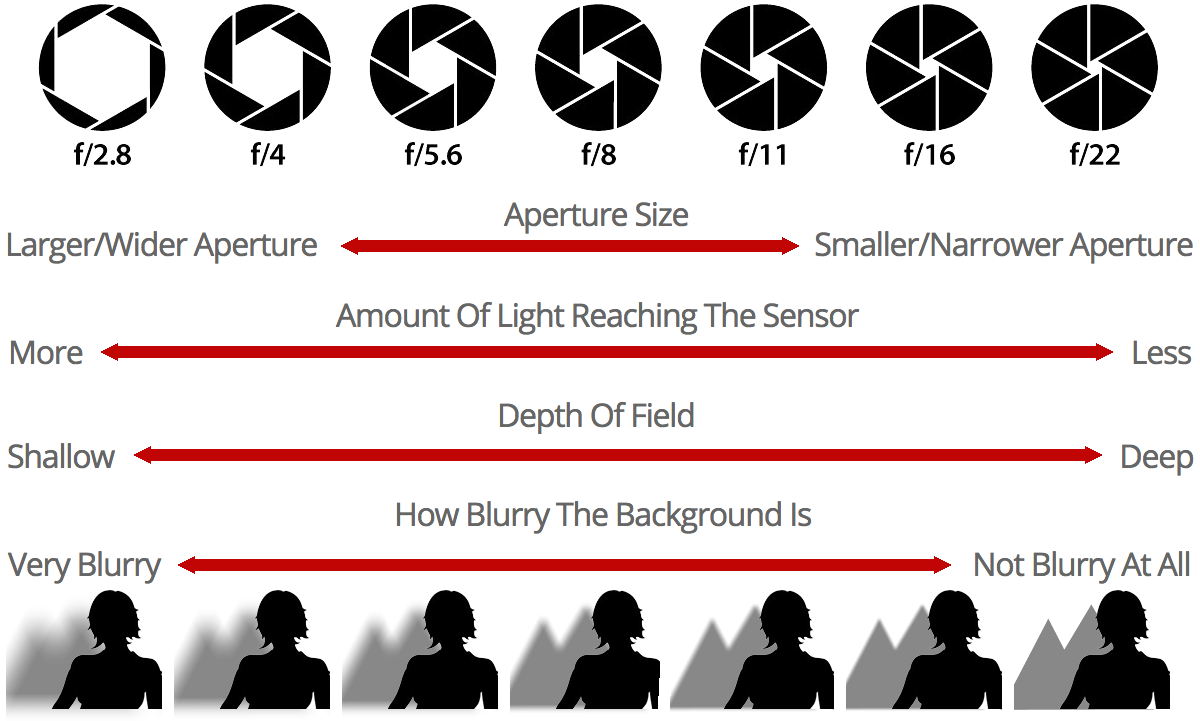
The adjustable opening—or f-stop—of a lens determines how much light passes through the lens on its way to the film plane, or nowadays, to the surface of the camera’s imaging sensor. “Faster” lenses have wider apertures, which in turn allow for faster shutter speeds. The wider the aperture is set, the shallower the depth of field will be in the resulting image.
Wider apertures allow for selective focus, the ability to isolate your subject from background and foreground elements within the frame. Conversely, if you stop the lens aperture down to its smallest openings, you increase the depth of field, or the amount of focus from foreground to background. Generally speaking, most lenses display the highest level of resolving power when set to about three stops down from the widest aperture.
The term “highest level of resolving power” does not mean the greatest level of depth of field. It just means what is in focus cannot be rendered any sharper by that particular lens, regardless of the image’s depth of field.
APS-C (APSC)
A term used to describe the size of the digital imaging sensors used in almost all compact DSLRs. The name is derived from the APS (Advanced Photo System) film format that was introduced in 1996 for the amateur point-and-shoot market. The APS format is about half the size (23.6 x 15.8mm) of a standard 35mm frame (24 x 36mm) and has a 1.5x magnification factor (multiply the focal length x 1.5) for determining the 35mm equivalent focal length of lenses used on APS-C format cameras. APS-C format DSLRs from Nikon, Pentax, Fujifilm, and Sony (Alpha) contain APS-C sized imaging sensors.
Canon compact DSLRs, which include EOS Rebel-series DSLRs, contain APS-C format imaging sensors that are slightly smaller than competitive compact DSLRs (22.3 x 14.9mm, so the lens factor for these cameras would be 1.6x). Although it does further reduce the effective field of view of your lenses, they are slightly more telephoto than their 1.5x brethren.
For more on crop factor, see the explora article, “Understanding Crop Factor.”
Aspect Ratio
Aspect ratio refers to the shape, or format, of the image produced by a camera. The ratio is derived by dividing the width and height of the image by their common factor. The aspect ratio of a 35mm image (36 x 24mm) is found by dividing both numbers by their common factor: 12. So, if you divide each by 12, your resulting ratio will be 3:2. Most computer monitors and digital cameras have a 4:3 aspect ratio. Many digital cameras offer the option of switching between 4:3, 3:2, or 16:9.
Autofocus
The ability of the camera and lens to keep the subject in focus during an exposure. Autofocus can be Continuous, meaning focus is maintained regardless of where it moves within the frame, or Single, meaning the point of focus is locked regardless of where the subject may move. For more on this subject, see the explora article, “How Focus Works.”
AWB (Auto White Balance)
An in-camera function that automatically adjusts the chromatic balance of the scene to a neutral setting, regardless of the color characteristics of the ambient light source. For more on this subject, see White Balance, below, as well as this explora article, “Understanding White Balance and Color Temperature in Digital Images.”
Although AWB generally does an acceptable job of cleaning up the color balance of a scene, there are times when AWB should not be used. Examples of times you should avoid AWB are sunrise and sunset—such scenes would lose their warm qualities with the camera set to AWB. When capturing sunrises and sunsets, the camera should be set to Daylight to maintain the warm tonalities that make dawn and dusk so visually inviting.
B
Barrel Distortion
An optical distortion resulting in the image bowing out of square. Barrel distortion is usually associated with less expensive wide-angle lenses and digital cameras, and is most apparent in architectural photographs or images containing lines that run parallel to each other in the horizontal or vertical plane. For more on this subject, see the explora article “Optical Anomalies and Lens Corrections Explained.”
Bit
A bit (binary digit) is the smallest unit of digital information. Eight bits equals one byte. Digital images are often described by the number of bits used to represent each pixel, i.e., a 1-bit image is monochrome; an 8-bit image supports 256 colors or grayscales; while 24 or 32-bit images support an even greater range of color.
Bitmap
A method of storing digital information by mapping out an image bit by bit. The density of the pixels determines how sharp the image resolution will be. Most image files are bitmapped. Bitmap images are compatible with all types of computers.
Blowout
Blowout is caused by overexposure, which results in a complete loss of highlight detail. With the exception of raw files captured within two stops of the correct exposure, blown-out highlights are difficult, if not impossible, to correct after the fact.
BMP
A bit-mapped file format used by Microsoft Windows. The BMP format supports RGB, indexed-color, grayscale, and Bitmap color modes.
Bokeh
An English transliteration of a Japanese word that means “haze” or “blur.” Pronounced boh-keh, it refers to the out-of-focus areas in a photograph with limited depth of field, particularly around, but not limited to, the highlight areas. Bokeh appears as little circles in the unsharp areas. Depending upon the shape of the opening formed by the blades of the lens’s aperture, the circles appear either more or less circular. For more on this subject, see the explora article, “Understanding Bokeh.”
Bracketing
Bracketing involves taking multiple images of the same scene, usually in 1/3, 1/2, or full-stop increments, to create a choice of exposure options. Many cameras offer the option of bracketing as a custom function. An advanced application of bracketing is HDR imaging (High Dynamic Range) in which several bracketed images are sampled in-camera and selectively combined into a single, optimized image file.
Buffer Memory
A buffer memory is a temporary “holding area” for image data waiting to be processed in a camera. Buffers enable a camera to continue capturing new image files without having to shut down while previous image files are processed. Printers also make use of buffers, which allow you to queue up several pictures at a time while the printer outputs previously queued-up image files.
Burst Rate
The number of consecutive images a digital camera can capture continuously before filling the memory buffer or memory card. To capture a burst of images, the camera must first be locked into “Burst” mode or “Continuous” mode.
C
Card Reader/Writer
A device that allows you to transfer data directly from a camera’s removable memory card to the computer, without being compelled to connect the camera to the computer.
CCD (Charge-Coupled Device)
A semiconductor device that converts optical images into electronic signals. CCDs contain rows and columns of ultra small, light-sensitive mechanisms (pixels) that generate electronic pulses when electronically charged and exposed to light. These pulses work in conjunction with millions of surrounding pixels to collectively produce a photographic image. CCDs and CMOS (Complementary Metal Oxide Semiconductor) sensors are the dominant technologies for digital imaging.
CCD, Linear
Aka scanner-type CCD, linear CCDs are long, thin sensors that capture an image by recording a vast number of individual “exposures” while scanning across the picture frame. These are best suited for still subjects and continuous illumination. Linear CCDs are predominantly (if not exclusively) used for technical applications.
Chromatic Aberration
Also known as color fringing, chromatic aberration occurs when the collective color wavelengths of an image fail to focus on a common plane. The results of chromatic aberration are most noticeable around the edges of high-contrast images, especially toward the edges of the frame. Chromatic aberration is most common on less expensive lenses, although even the best optics can occasionally display lower levels of chromatic aberration, under certain conditions.
Another form of chromatic aberration is called “purple fringing,” which comprises the purple streaks or halos that often appear within images produced by digital cameras. Purple fringing originates in the light refracted from the light-gathering micro lenses that cap the sensor’s pixels. In backlit scenes, this form of purple fringing is commonly called “blooming.” For more on this subject, see the explora article, “Optical Anomalies and Lens Corrections Explained.”
CMOS (Complementary Metal Oxide Semiconductor)
A type of imaging sensor, CMOS chips are less energy consuming than CCD-type sensors and are the dominant imaging technology used in DSLRs. Although once considered an inferior technology compared to CCD sensors, CMOS sensors have vastly improved and now represent the more common sensor technology.
CMY Color (Cyan, Magenta and Yellow)
These three secondary colors can be combined to recreate all other colors. Like CMYK, CMY is used in printing to create the colors seen in a print, although with less density in the blacks than CMYK color. CMY color is used in some of the least expensive desktop printers.
CMYK Color (Cyan, Magenta, Yellow, Black)
CMYK is the color space used for commercial offset printing. CMYK is also a common working color space for inkjet, laser, dye-sublimation, and wax thermal printers.
Codec
A codec is file format for recording video files. Popular codecs include H.264, MJPEG, MPEG-4 AVC/H.264 and AVCHD.
Color Calibration
A process by which the image source (digital camera or scanner), monitor and output (printer) are calibrated to use the same or similar color standard, i.e., Adobe RGB, sRGB, etc). This ensures that the image viewed on the monitor has the same range of colors as the image that is printed, and any adjustments made to the color of the image in the computer are accurately represented when the image is printed.
Color Depth
The number of distinct colors that can be represented by a piece of hardware or software. Color depth is sometimes referred to as “bit” depth because it is directly related to the number of bits used for each pixel. A 24-bit digital camera, for example, has a color depth of 2 (2 bits of color) to the 24th power, resulting in a dynamic range of 16,777,216 colors. Similarly, an inexpensive 8-bit color monitor can only reproduce a total of 256 colors, which is far less than the expansive range of color contained in the digital image files captured by almost all consumer digital cameras.
Color Palette
A palette is the set of available colors. For a given application, the palette may be only a subset of all the colors that can be physically displayed. For example, many computer systems can display 16 million unique colors, but a given program would use only 256 of them at a time if the display were in 256-color mode. The computer system’s palette, therefore, would consist of the 16 million colors, but the program’s palette would only contain the 256-color subset.
Color Space
The range of colors that can be reproduced on a computer monitor or in print. The most commonly used color spaces for digital imaging are the baseline sRGB and wider-gamut Adobe RGB (1998).
Color Temperature
A linear scale for measuring the color of ambient light with warm (yellow) light measured in lower numbers and cool (blue) light measured in higher numbers. Measured in terms of “degrees Kelvin*,” daylight (midday) is approximately 5600K, a candle is approximately 800K, an incandescent lamp is approximately 2800K, a photoflood lamp is 3200 to 3400K, and a midday blue sky is approximately 10,000K. For more on this subject, see the explora article, “Understanding White Balance and Color Temperature in Digital Images.”
*Named for engineer and physicist Lord Kelvin (William Thomson), who conceived of the thermodynamic temperature scale, in 1848.
CompactFlash Card (CF)
A popular flash memory device, which is available in a number of storage capacities. Unlike earlier mechanically driven MicroDrives, newer CF cards are solid state, quite stable, and are capable of operating under extreme environmental conditions. Once the dominant format for in-camera data storage, CF cards have receded from the spotlight as smaller SD/SDHC/SDXC memory cards have become the card of choice in ever-smaller digital cameras.
Compression
A method of reducing the size of a digital image file to free up the storage capacity of memory cards and hard drives. Compression technologies are distinguished from one another by whether or not they remove detail and color from the image. Lossless technologies compress image data without removing detail, while “lossy” technologies compress images by removing some detail. Joint Photographic Experts Group (JPEG) is a lossy compression format supported by JPEG, PDF and PostScript language file formats. Most video formats are also lossy formats. TIFF files are not and, as such, are far more stable than JPEGs and other lossy file formats.
D
Dark Current (aka “Noise”)
Pixels collect signal charges in the absence of light over time, which can vary from pixel to pixel. The result is known as dark current, or more commonly, noise.
Depth of Field (DOF)
Literally, the measure of how much of the background and foreground area before and beyond your subject is in focus. Depth of field can be increased by stopping the lens down to smaller apertures. Conversely, opening the lens to a wider aperture can narrow the depth of field. For more on this subject, see the explora article, “Depth of Field, Part I: The Basics.”
Digital Asset Management (DAM)
This is the process of managing tasks and decision making regarding the import, export, annotation, cataloguing, storage, retrieval, and distribution of digital assets such as image files.
Digital Negative
Digital Negative (DNG) is a publically available raw image format owned by Adobe and used for digital photography. It’s based on the TIFF/EP standard format and incorporates the use of metadata.
Digital Zoom
Unlike an optical zoom, which is an optically lossless function of the camera’s zoom lens, digital zoom takes the central portion of a digital image and crops into it to achieve the effect of a zoom. This means that the existing data is not enhanced or added to, merely displayed at a lower resolution, thereby giving an illusion of an enlarged image.
DPI (Dots per Inch)
Printing term for resolution. Also referred to as ppi (pixels per inch) when describing monitor resolution. The higher the ppi/dpi, the higher the resolution of the resulting image will be. For viewing images at magnifications of up to life size on a computer screen, you only need 72 dpi. For offset printing, the image must be set to 300 dpi at the desired print size, and for inkjet prints, anywhere from 180 to 360 dpi at the desired print size, preferably with a number divisible by 3. Dpi settings above 400 can diminish the quality of inkjet output.
DSLR (Digital Single Lens Reflex)
A single lens reflex (SLR) camera that captures digital images.
Dye Sublimation
A printing method where waxy ink is heated to temperatures high enough for the ink to vaporize and bond with a special receiver paper, resulting in images with continuous tone color. The word sublimation is used because the dye goes straight from being a solid to a gas and completely skips the liquid stage. Dye-sublimation prints are also known as dye-subs.
Dye-Sublimation Printer
Dye-sublimation printers, or “dye-sub” printers, are a type of digital photo printer. Unlike inkjet printers, which spray fine droplets of ink on the print surface, dye-sub printers employ a cellophane ribbon that momentarily vaporizes when heated to extremely high temperatures, while being transferred to the print surface.
Essentially a three-color process (cyan, magenta, yellow, and a protective over-coating), dye-sub printers are popular in commercial print shops for their ability to output durable, high-quality photographic prints quickly and relatively inexpensively.
E
Effective Pixels
Effective Pixels is a measurement of the number of pixels that actively record the photographic image within a sensor. As an example, a camera might hold a sensor containing 10.5 megapixels, but they have an effective pixel count of 10.2 megapixels. This discrepancy is due to the fact that digital imaging sensors have to dedicate a certain percentage of available pixels to establish a black reference point. These pixels are usually arranged frame-like, along the edge of the sensor, out of range of the recorded image.
Electronic Viewfinder (EVF)
An electronic viewfinder digitally replicates the field of view of the area captured by the camera lens. While once considered a poor replacement for optical viewfinders, newer EVFs containing a million-plus pixels and faster refresh times have become quite accurate, in many cases approaching the clarity levels of optical finders. An advantage of EVFs is their ability to display exposure data and grids on demand.
EXIF (Exchangeable Image File)
Commonly used header format for storing metadata (e.g. camera/lens/exposure information, time/date/, etc.) within digital image files.
Exposure
Exposure is the phenomenon of light striking the surface of film or a digital imaging sensor. The exposure is determined by the volume of light passing through the lens aperture (f/stop) combined with the duration of the exposure (shutter speed). For more on this subject, see the explora article, “Understanding Aperture.”
The proper exposure, which is best determined using a light meter, can be established in a number of exposure modes including manual, program (automatic), shutter priority, and aperture priority. For more on this subject, see the explora article, “Understanding Camera Shooting/Exposure Modes.”
Exposure Compensation
Adding to or subtracting from the “correct” exposure time indicated by the camera’s light meter, which results in a final exposure that is either lighter or darker than the recommended exposure time. Most cameras allow for exposure compensation in 1/2, 1/3, or full-stop increments. Note that the “correct” exposure is not necessarily the “best” exposure.
F
F-Stop (Aperture)
A term used to describe the aperture, or diaphragm opening of a lens. F-stops are defined numerically: f/1.4, f/5.6, f/22, etc. Larger, or wider apertures, allow more light to enter the lens, which calls for faster shutter speeds. “Faster” (wider) apertures also allow for selective focus (narrow depth of field), while slower (smaller) apertures allow for greater depth of field. Wider apertures are preferable for portraits, while smaller apertures are preferable for landscapes. For more on this subject, see the explora article, “Understanding Aperture.”
Field Monitor
Ranging in size from a few inches to about a foot diagonally, field monitors serve as a highly accurate alternative to the smaller viewing screens found on most video cameras and camcorders, assisting with critical focus and exposure calibration. With the advent of video capture using HDSLRs, field monitors have become part and parcel of many HDSLR users’ equipment inventories.
File Format
The way an image is saved to a digital camera’s memory. JPEG, TIFF, and raw (DNG or other proprietary file formats) are the most common file formats found in digital cameras.
Firmware
Software programs or data that have been written to read-only memory (ROM). Firmware is a combination of software and hardware. In digital cameras, the firmware is the program that allows the user to activate and control the features of the camera.
Flash Sync
Flash sync is used to describe either the connection point where you plug an external electronic flash into your camera (usually a PC port or the camera’s hot shoe), or the fastest shutter speed at which your camera can “sync” with an external flash. Most DSLRs have top sync speeds of 1/125th to 1/320th-second, although some camera/flash combinations can be synced at speeds of up to 1/15,000th-second.
Focal Length Magnifier
Also known as Magnification Factor or Crop Factor, this term is used to describe the angle of view (AOV) of a lens used on a DSLR in relation to how it would appear on a full-frame 35mm camera. As an example, compact DSLRs contain sensors that are about 50% smaller than a standard 35mm frame. As a result, the effective focal length and AOV of a 50mm lens on a compact DSLR would be reduced, or cropped to the equivalent of a 75mm lens. Canon EOS Rebels and other compact Canon DSLRs have a 1.6x magnification factor, which would make a 50mm lens effectively an 80mm lens. For more on this subject, see the eplora article, “Understanding Crop Factor.”
Follow Focus
A follow focus is a focus-control mechanism used in filmmaking (with film cameras) and in television production (with professional video cameras). There are now follow-focus units that have been designed for use with HDSLR cameras that are used to capture video footage.
Four Thirds (4/3)
A compact digital camera format designed around a 17.3 x 13mm imaging sensor, which is a quarter the size of a full-frame (35mm) imaging sensor. Four Thirds cameras and lenses are manufactured primarily by Olympus and Panasonic. Lenses are made by several manufacturers. A variation of Four Thirds is Micro Four Thirds, a mirrorless Four Thirds camera format, which is even smaller than standard Four Thirds format cameras. The sensors in Four Thirds and Micro Four Thirds are identical, but Micro Four Thirds optics cannot be used on standard Four Thirds camera bodies, due to their smaller lens mounts.
Fringing
Fringing, commonly associated with less expensive lenses, describes the “bleeding” of color along the edges of high-contrast portions of a digital image. Fringing often shows up as cyan blurring on one side of a high-contrast object, complemented by red or magenta blurring on the opposite side of the object.
G
Gain
Gain refers to the relationship between the input signal and the output signal of any electronic system. Higher levels of gain amplify the signal, resulting in greater levels of brightness and contrast. Lower levels of gain will darken the image, and soften the contrast. Effectively, gain adjustment affects the sensitivity to light of the CCD or CMOS sensor. In a digital camera, this concept is analogous to the ISO or ASA ratings of silver-halide films.
Gamma
The brightness curve of the color spectrum as displayed (or reproduced) on a computer monitor, a printer or scanner.
GIF
Graphic Interface designed by CompuServe for using images online. This is a 256-color or 8-bit image.
GPS (Global Positioning System)
A technology for establishing the location of earth-based objects, using coordinates obtained by orbiting satellites. These coordinates can be embedded into the headers of digital images as accurate reference points for where a photograph was taken.
GUI (Graphical User Interface)
Pronounced “GOO-ey.” Refers to a program interface that takes advantage of the computer’s graphics capabilities to make the program easier to use.
H
Hardware Calibration
A method of calibrating a digital camera, scanner, printer or monitor using specialized hardware such as colorimeters, densitometers, and spectrometers.
HDSLR
A digital single lens reflex camera (DSLR) that can also capture high-definition video. Most current DSLRs are also HDSLRs, making the terms almost interchangeable.
Histogram
A visual representation of the exposure values of a digital image. Histograms are most commonly illustrated in graph form by displaying the light values of the image’s shadows, midtones, and highlights as vertical peaks and valleys along a horizontal plane. When viewing a histogram, the shadows are represented on the left side of the graph, highlights on the right side, and midtones in the central portion of the graph. For more on this subject, see the explora article, “How to Read Your Camera’s Histogram.”
Hot Shoe
A “live” accessory shoe, usually located on the top of the camera prism housing, which enables you to mount and trigger an electronic flash or wireless transmitter. Hot shoes can also be used to support external microphones, electronic viewfinders, GPS devices, and field monitors.
I
ICC Profile (International Color Consortium profile)
A universally recognized color-management standard for specifying the color attributes of digital imaging devices (scanners, digital cameras, monitors, and printers) to maintain accurate color consistency of an image from the point of capture through the output stage.
Inkjet
A printing method in which the printer sprays micro-jets of ionized ink at a sheet of paper in droplet sizes as small as 2 picoliters. Magnetized plates in the ink’s path direct the ink onto the paper in the desired shapes and patterns to make an image.
Interlaced Scan
Interlaced video is a commonly used video capture technique in which the imagery consists of two fields of data captured a frame apart and played back in a manner that reproduces motion in a natural, flicker-free form. Interlaced video takes up less storage capacity than progressively captured video.
ISO
ISO (International Organization for Standardization) The film speed rating expressed as a number indicating an image sensor’s (or film’s) sensitivity to light. The higher the number, the more sensitive and faster the sensor (or film) is. Although traditional cameras don’t have a specific ISO rating, digital cameras do as a way to calibrate their sensitivity to light. ISO is equivalent to the older ASA.
Most digital cameras have native (basic) ISO ratings of about 100, but can be “extended” far beyond this base rating in order to capture sharp imagery under lower lighting conditions. When shooting at extended ISO levels, image quality begins to suffer in terms of sharpness levels, noise, contrast, and added “graininess.”
J
JPEG
(Joint Photographic Experts Group) The de facto standard for image compression in digital imaging devices. JPEG is a “lossy” compression format, capable of reducing a digital image file to about 5% of its normal size. The resulting decompression of the file can cause “blockiness,” “jaggies,” or “pixelization” in certain digital images. The greater the compression levels, the more of a chance pixelization or “blockiness” will occur. The greater the pixel count, the less of a chance pixelization will occur.
K
Kilobyte
1,024 bytes, written kB, is used to refer to the size of an image file. This relates to the amount of information, or image data, the file contains.
L
Lag Time
Also known as shutter lag, lag time refers to the delay that sometimes occurs between the time the shutter button is pressed and the time the shutter fires. Shutter lag is most prevalent when using less expensive point-and-shoot cameras.
LCD (Liquid Crystal Display)
LCD screens, usually found on the rear of digital cameras, allow you to preview and review photographs you are about to take or have taken. LCDs utilize two sheets of polarizing material with a liquid crystal solution between them. An electric current passed through the liquid causes the crystals to align so light cannot pass through them. Each crystal, therefore, is like a shutter, either allowing light to pass through or blocking the light and producing an image in color or monochrome.
Lithium-Ion
A type of rechargeable battery that was originally developed for use with camcorders and is now used as a power source for most digital still cameras and camcorders.
Lossy
A data-compression technique that can reduce the detail of a digital image file. Most video compression techniques utilize lossy compression. See non-lossy or lossless.
Low-Pass Filter
Used with digital imaging, low-pass filters are integrated into many digital sensors to suppress aliasing and moiré.
M
Matrix Metering
Also known as segmented metering, matrix metering takes the total image area and breaks it into sections, which are analyzed by the camera’s light meter and compared to the light values of the surrounding sections. The results are then compared to similar lighting situations stored in the camera’s memory and a correct exposure is established. This entire process occurs in a few microseconds. For more on this subject, see the explora article, “Understanding Camera Metering Modes.”
Megabyte
1,024 Kilobytes, written MB, is used to refer to the size of files or media, such as hard drives. The number refers to the amount of information or image data in a file or how much information can be contained on a memory card, CD or DVD, hard drive or disk.
Megapixel
A megapixel contains 1,000,000 pixels and is the unit of measure used to describe the size of the sensor in a digital camera.
Memory
The camera’s file-storage medium. Most cameras use flash memory, which is a safe, highly reliable form of storage that doesn’t need power to hold the images after they are saved. Flash memory won’t erase the images unless the user chooses to do so. Some cameras contain a limited quantity of built-in memory, but certainly not enough to capture more than a dozen or so images.
Memory Card
In digital photography, a memory card is a removable device used in digital cameras to store the image data captured by the camera. There are several different types of memory cards available including CompactFlash, SmartMedia, SD/SDHC/SDXC, XD, and others.
Micro Drive
Developed by IBM, micro drives are one of the original types of digital memory cards for digital cameras. Essentially small hard drives, micro drives have given way to solid-state Compact Flash cards, which contain no moving parts and, as such, are far more reliable.
Micro Lenses
Micro lenses are commonly mounted on the tops of the light-gathering portion of pixels (aka photons) and are often angled along the edges of camera sensors to capture and redirect light back into the pixel, as a method of reducing light falloff on the edges of the image and redirecting it for image processing. Not to be confused with NIKKOR micro lenses.
N
NiCad (Nickel Cadmium ) Battery
A type of rechargeable battery, the NiCad battery was one of the first successful rechargeable batteries used in small electronics, such as digital cameras.
NiMH ( Nickel-Metal Hydride) Battery
A commonly used rechargeable battery for digital cameras and camcorders. A NiMH battery can offer two to three times the capacity of an equivalent size NiCad battery.
Noise
A common bugaboo of digital photography, noise is the appearance of color artifacts in a digital image. Mostly noticeable in the shadow areas of images captured at higher ISO ratings, the image processors used in many current digital cameras utilize noise-suppression software to minimize the appearance of noise artifacts. Heat build-up due to continuous shooting in hot environments can also cause noise artifacts within digital images. Noise is considered the digital version of grain in film negatives.
Noise Reduction
A process in a digital camera’s image processor in which the artifacts caused by “pushed” ISO ratings or other electrical or heat-related artifacts are suppressed or eliminated in an image.
Non-lossy (aka lossless)
A term that refers to data compression techniques that do not remove image data details, to achieve compression. This method is generally less effective than lossy methods in terms of reducing file size, since the entire original image is retained. See lossy.
S
Strobe
The strobe is the larger, powered light that is used with the photo booth. You can control the strobe’s intensity by adjusting the dial settings. Or you can use a lighting modifier like an umbrella or softbox.